For HVAC, plumbing and electrical shops, from one truck to fifty

HVAC, Plumbing & Electrical SoftwareWith 11 AI Tools Built In

Most shop owners start the day on the phone, working out who goes where. ServiceMerge puts every job, tech and invoice on one board. It answers the calls you miss after hours, and it writes up estimates from what you tell it on the drive home.

No card needed to try itOne price for the whole crewFull refund in the first 30 days
Dispatch Board
Technicians
8 AM
9 AM
10 AM
11 AM
12 PM
1 PM
2 PM
3 PM
RARay Alvarez
8:00 – 10:00
Hollis Residence
118 Birch Hollow Rd
10:00 – 1:00
Quarry Street Deli
42 Quarry St · AC not cooling
DBDana Brooks
9:00 – 12:00
Pemberton Home
9 Lantern Ct · Panel upgrade
1:00 – 3:00
Okafor Residence
77 Wren Ave
TNTomás Nguyen
8:00 – 10:00
Marsh Residence
305 Tidewater Ln
10:00 – 12:00
Lindqvist Home
16 Cobble Way
KLKeisha Lin
9:00 – 11:00
Delgado Residence
58 Orchard Bend
11:00 – 2:00
Harbor Fitness
200 Mill Pond Rd · RTU
MFMarcus Foster
8:00 – 11:00
Vance Residence
4 Juniper Row · Repipe
Optimize Route · Ray A.
CURRENT
2h 29m
103.5 mi
OPTIMIZED
2h 13m
85.3 mi
YOU SAVE
16 min
18.2 mi
Sample route · your savings will vary
Priced per shopPlans are priced by the shop, so you're not paying per technician
Try it for 14 daysWe don't ask for a card up front
30-day refundIf it doesn't work for your shop, ask and we refund you. No forms, no sales call.
Built by a contractorYour questions go to the person who built it
Mark Norman, founder of ServiceMerge
From the founder

I Built This Because I Needed It

“I'm a licensed Florida contractor. I ran my own trade company for 20 years and sold it, then built ServiceMerge around the headaches I had and kept hearing from other contractors. It's the platform I wished existed.”

Mark NormanFounder, ServiceMerge
What it does

How a job moves through ServiceMerge

Here's what a normal day looks like with it, and the rest of the tools a shop ends up needing.

AI Voice Receptionist

Someone picks up at 2 AM

When a customer calls after hours, the AI receptionist answers on your business number, finds them in your customer list, puts the job on the board and texts them a confirmation. You see it on the board in the morning.

  • Answers on your business number, day or night
  • The job lands on your dispatch board
  • The customer gets a text confirming the time
Beth Hollis(555) 014-2231 · 2:14 AM
● AI answering
Water heater's leaking all over the garage floor.
Sorry to hear that. Shut the cold-water valve on top if you can. I can get a plumber out at 8 AM. Does that work?
Yes, please.
Job booked · Tue 8:00 AMText sent ✓
AI Estimate Builder

Talk through the job and get an estimate back

On the drive back, describe the job the way you'd explain it to a helper. ServiceMerge turns it into line items priced from your own price book, ready for the customer to sign.

  • Priced from your price book
  • The customer signs on your tech's phone
  • Becomes the invoice when the work is done
“Swap the 50-gallon gas water heater, add an expansion tank, haul the old one.”
50-gal gas water heater, installed$1,685.00
Thermal expansion tank$145.00
Haul-away & disposal$75.00
Estimate$1,905.00
Sample estimate · your price book, your numbers
Estimates, invoices & payments

Collect payment while you're still on site

Send the invoice from the job, take a card or ACH payment through Stripe, and let it sync to QuickBooks Online by itself. The money usually reaches your bank in one to two days.

  • Card or ACH, paid out in 1 to 2 days
  • See what's open, overdue and paid
  • Syncs with QuickBooks Online
InvoicesThis month
OUTSTANDING$4,212
PAID$18,940
OVERDUE$640
INV-2041Hollis Residence$1,905.00
INV-2040Quarry Street DeliSENT$2,380.00
INV-2038Okafor ResidenceOVERDUE$640.00
INV-2036Harbor Fitness$4,120.00
Technician app · iOS & Android

What your techs see on their phone

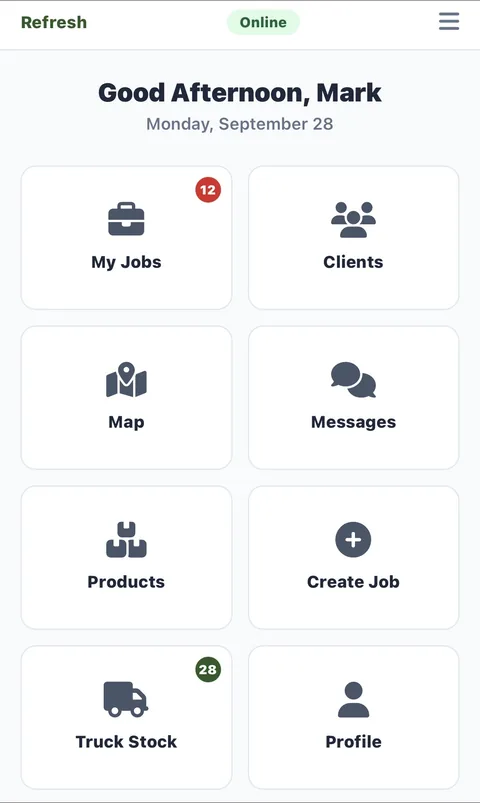
Techs see their jobs, directions, customer notes and what's on the truck. They take photos and collect signatures and payments on site. When they pull into the driveway, the app marks them arrived on its own.

  • Jobs, customers, map and messages on the home screen
  • Truck stock counted on the phone
  • Arrival and departure logged automatically
ServiceMerge Technician Portal sign-in screen on iPhone
ServiceMerge technician app home screen: My Jobs, Clients, Map, Messages, Products, Create Job, Truck Stock, Profile

Real screens from the ServiceMerge iOS app

Download on the App Store

The rest of the toolbox

Smart SchedulingDrag jobs around the calendar and it suggests the shortest routes.
Live GPS DispatchingSee where every truck is and send the closest one.
Customer ManagementEach customer's history, notes and past jobs in one place.
Customer PortalCustomers can book, approve an estimate, pay, and see when you'll arrive.
SMS NotificationsTexts when you're on the way, appointment reminders and receipts.
Review AutomationAfter the job, the customer gets a text asking for a Google review.
Recurring MaintenanceSet up a service plan and the next visit gets scheduled for you.
Job CostingSee what each job made after labor, parts and overhead.
Business AnalyticsRevenue, finished jobs, and how each tech is doing.
Time TrackingClock-ins checked against GPS, with hours ready for payroll.
Inventory TrackingParts across your trucks and the shop, with a warning when you're running low.
Truck Stock WizardSet what each truck should carry. Parts come off as jobs close, and it tells you what to reorder.
Internal MessagingOffice and field chat, attached to the job it's about.
Granular PermissionsDecide exactly what your techs, office staff and managers can see and change.
QuickBooks SyncCustomers, invoices and payments sync both ways with QuickBooks Online.
Why ServiceMerge

What changes once you switch

24/7
Calls Answered

After-hours calls get answered and booked instead of going to voicemail.

1
Visit to Get Paid

The invoice, the signature and the payment all happen at the job.

0
Double Entry

QuickBooks stays in sync, so nobody types an invoice twice.

$29
To Start

Plans start at $29 a month, and you can try it free for 14 days first.

Try it on next week's jobs

Put a couple of weeks of real jobs through it and see if it fits. You won't need a card.