Your Entire Office.
In Your Pocket.
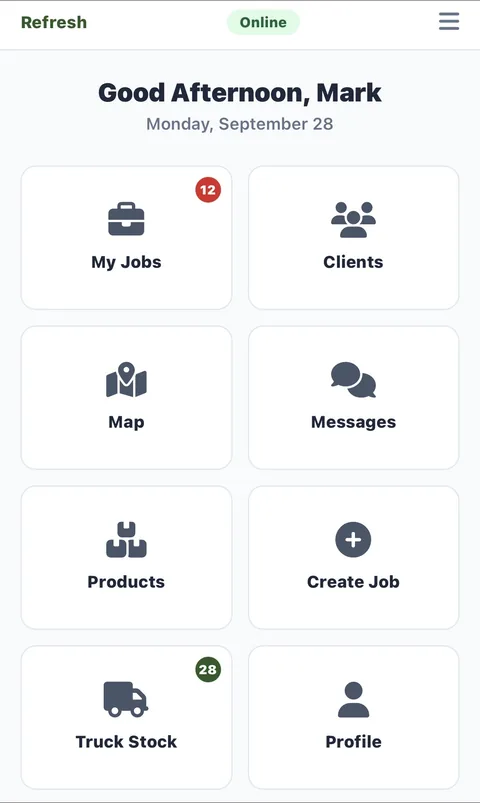
Jobs, GPS, estimates, invoices, signatures, photos, time tracking — everything your techs need in the field, on one app.
Get the App
Android
Version 1.3 · 3.7 MB
Requires Android 8.0 (Oreo) or later
Android Install Steps
Since this is a direct download (not from the Play Store), you'll need to allow installation from your browser.
- 1
Enter your email
Tap Download APK above and enter your email. We'll send you a secure one-time download link.
- 2
Open the file
When the download finishes, tap the notification or find
servicemerge-tech.apkin your Downloads folder. - 3
Allow installation
Android will ask you to allow installs from this source. Tap Settings → toggle Allow from this source → tap Install.
- 4
Open & log in
Once installed, open ServiceMerge and log in with the same technician credentials your admin gave you.
What Your Techs Can Do
Jobs & Schedule
Today's jobs, details, status updates
GPS & Navigation
Auto-arrive, geofencing, directions
Estimates & Invoices
Create, send, convert on site
Job Photos
Before/after, upload to the job
E-Signatures
Customer signs on screen
Time Tracking
Clock in/out, breaks, job time
Masked Calling
Call customers via company number
Messaging
In-app and SMS to customers
Truck Inventory
Materials from your truck stock
Requirements
- Active ServiceMerge subscription for your company
- Technician account created by your admin
- Android 8.0 (Oreo) or later · iPhone iOS 16+
- Internet connection (cellular or Wi-Fi)